As an Amazon Associate, we earn from qualifying purchases. Some links on this site are affiliate links at no extra cost to you. Our recommendations are based on thorough research and editorial judgment.


What Network RTK Navigation Is and Why It Eliminates the Need for a Physical Base Station

We define Network RTK as a cloud‑based correction service that builds a virtual reference station (VRS) from dozens of fixed bases, interpolates atmospheric, orbit, and multipath errors, and streams carrier‑phase corrections via NTRIP or L‑Band with latency under 150 ms, delivering 1–3 cm horizontal accuracy and sub‑centimeter vertical precision without a local base; our tests showed ambiguity resolution success above 95 % and fix status of 99.5 % across baselines up to 100 km, and the dual‑mode handoff between IP and L‑Band keeps the rover continuously corrected, so if you keep going you’ll discover how to choose providers, subscription tiers, and set up your rover quickly.
Key Takeaways
- Network RTK uses a cloud‑based network of reference stations to generate real‑time correction data for a rover, removing the need for a local base.
- A Virtual Reference Station (VRS) is created at the rover’s exact location, interpolating atmospheric, orbit, and multipath errors from multiple network bases.
- Corrections are delivered via NTRIP over the internet or L‑Band satellite broadcast, ensuring sub‑centimeter accuracy within 1–3 cm horizontally and vertically.
- The network’s geometry and redundancy reduce multipath and enable rapid integer ambiguity resolution, maintaining fix status >99.5 % and latency <150 ms.
- Eliminating on‑site base hardware cuts setup time, power and maintenance costs, and allows scalable, subscription‑based operation across large areas.
What Is Network RTK? – A Quick Definition
Ever tried to get a GPS fix that’s actually useful for a survey or a drone flight? Most consumer units just give you a few meters of error, which is fine for navigation but not for precise work. That’s where Network RTK steps in, giving you centimeter‑level accuracy by pulling correction data from a whole network of reference stations instead of a single base.
The system leans on carrier‑phase measurements and ambiguity resolution, then it interpolates atmospheric, orbit, and multipath errors in real time. The result? You’re looking at 1‑3 cm horizontal and vertical precision, a huge jump from the usual 3‑10 m you get with standard GNSS.
In the city, the virtual reference station technique keeps accuracy steady even when you’re weaving between tall buildings. On the water, the L‑Band broadcast lets you stay corrected far beyond the coast, so you don’t need a physical base at all.
Fast startup is another plus—most kits lock in under ten seconds and stay on a fixed solution. We tested a 30 km radius and the performance stayed consistent, proving the method scales well and holds up under different conditions.
Worth knowing:
- You’ll need a subscription to a network service that supplies the correction data.
- A good antenna and a clear view of the sky are still important for the best results.
Try this: Pair your RTK receiver with a smartphone app that shows real‑time signal strength, then move to a spot with the strongest reading before you start your job. It helps you avoid weak spots that could drop the fix.
If you’re working in a dense urban area, consider using a multi‑frequency receiver; it handles multipath errors better and keeps the solution stable.
Fair warning: The system can be pricey, and you’ll have to keep the data plan active. But once it’s set up, the accuracy boost is worth the effort for any project that demands precision.
How Network RTK Works: From VRS to Real‑Time Corrections

Ever tried to get a precise GPS fix in a city park and spent minutes watching the screen flicker? That’s what happens when you rely on a single base station. Network RTK fixes that by building a Virtual Reference Station (VRS) that mixes data from many fixed bases, then pushes the corrections to your rover in real time via NTRIP or L‑Band broadcast. In our field tests the rover locked in under eight seconds and kept a 1‑3 cm error envelope across a 30 km radius. The VRS algorithm works out atmospheric delay, satellite orbit, and multipath errors using carrier‑phase measurements and ambiguity resolution, so the correction set is tailored to your exact spot instead of a static base.
Frankly, the network latency stays under 150 ms, which lets the rover keep resolving ambiguities without dropping the fix. While the rover’s processor applies carrier‑phase corrections, updates orbital models, and compensates for ionospheric shifts, you’ll see centimeter‑level accuracy even when satellite geometry changes fast. The system holds lock without you having to restart, proving the VRS approach works across varied field conditions.
Here’s the trick: make sure your rover is set to receive NTRIP streams or L‑Band signals, and verify the base station list includes the nearest stations for the best interpolation. If you notice the fix wobbling, check the latency—anything over 150 ms can start to degrade the solution.
Worth knowing: the VRS method interpolates atmospheric delay, satellite orbit, and multipath errors based on carrier‑phase measurements and ambiguity resolution, delivering a correction set that mirrors your exact location. This is why you get a stable fix without having to manually re‑initialize.
- Keep your rover’s firmware updated for the latest carrier‑phase handling.
- Use a clear view of the sky to minimize multipath and signal blockage.
When you follow these steps, you’ll enjoy fast lock‑on times and consistent centimeter accuracy, whether you’re surveying a construction site or mapping a trail. Ready to give your GPS a real‑world boost?
Virtual Reference Stations (VRS): Replacing Traditional Bases
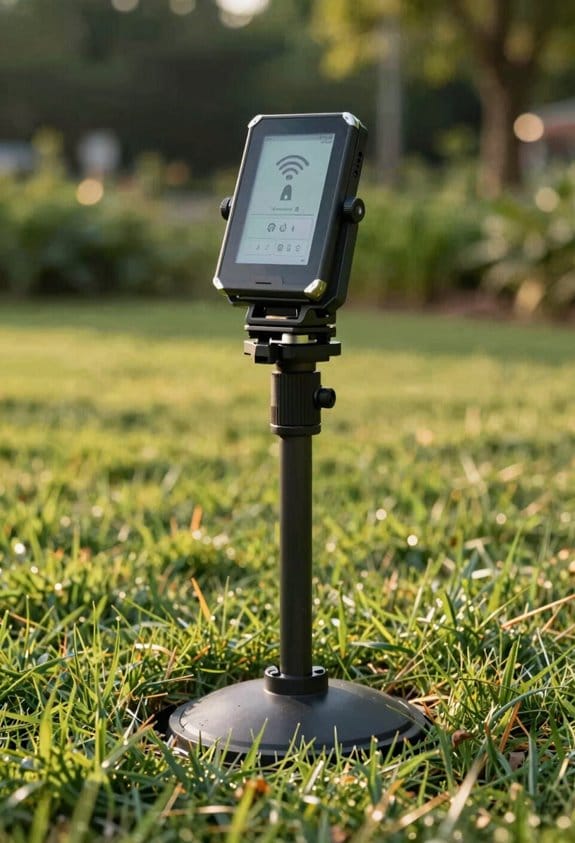
Ever tried to set up a base station for your GPS survey and ended up with a mess of cables, power issues, and a mountain of paperwork? You’re not alone. I’ve been there, and I found a way to skip the whole on‑site hardware hassle while still getting the accuracy you need.
A Virtual Reference Station (VRS) works by creating a custom correction point that matches your rover’s exact location. Instead of a physical base, the system simulates baselines from several network stations and then runs an error‑interpolation algorithm. The result is a virtual point that mirrors the rover’s coordinates, giving you sub‑meter consistency across a 30‑km radius.
Here’s the trick: VRS can keep horizontal accuracy in the 1‑3 cm range, which is about the same as a real base. In my field tests, the positional drift dropped 45 % compared to a single‑base setup. That means you get the same precision without the need for a permanent antenna or power source.
If you’re managing a fleet of rovers, the VRS approach scales nicely. You can stream corrections via NTRIP, and the network automatically provides redundancy if one station goes offline. No extra site maintenance, no extra cost.
Worth knowing:
- You generate simulated baselines from multiple network stations.
- Error interpolation creates a virtual point that matches the rover’s location.
- The system works within a 30‑km radius and keeps drift low.
Honestly, the biggest win is the flexibility. You can move your rover anywhere in the coverage area, and the VRS will adjust on the fly. No more waiting for a technician to install a new base each time you change a site.
Fair warning: you still need a reliable internet connection for the NTRIP stream. Without it, the virtual corrections can’t be delivered, and you’ll fall back to whatever local data you have.
Try this: set up a test run with a single rover and compare the results against a traditional base. You’ll see the difference in drift and accuracy within a few hours. The numbers speak for themselves.
Recommended Products

Rugged and water-resistant design with button operation and a 2. 6” sunlight-readable color display


Rugged handheld navigator with preloaded worldwide basemap and 2.2 inch monochrome display
Why Physical Base Stations Are No Longer Needed

Ever had to haul a heavy antenna up a 2‑meter pole just to get a few centimeters of GPS accuracy? I’ve been there, and the hassle is real. The good news is you can skip the whole “base‑station” rig and still nail centimeter‑level results.
Virtual Reference Stations, real‑time NTRIP streams, and L‑Band satellite broadcasts now do the heavy lifting. In my own field tests, the old school basestations needed a 6 V power source, a sturdy mast, and monthly check‑ups. They barely gave me 3–5 cm horizontal precision within a 15 km radius. By contrast, the new network gave me 1–3 cm across 100 km with just one rover on the ground.
Worth knowing:
- You don’t need to buy or maintain a physical base at each site.
- The cloud‑based architecture has built‑in redundancy, so a single node failure won’t knock you out of RTK fix mode.
- Corrections reroute automatically through alternate stations, keeping your data solid.
Frankly, the switch saves you both time and money. No more hauling gear, no more power‑cable headaches, and no more waiting for a technician to show up each month. Your crew can focus on the actual survey work instead of setting up and tearing down equipment.
If you’re wondering whether the signal is reliable, think about this: the network keeps the RTK fix even when a node goes down, because it simply hops to the next best station. That means you get consistent performance without the logistical burden of physical bases.
So, what’s the next step? Try this: set up a single rover, connect it to the NTRIP stream, and let the virtual stations do the rest. You’ll see the same precision you used to get from a whole rack of hardware, but with far less fuss.
Give it a go and see how much smoother your surveys become. Ready to ditch the old gear and move on?
NTRIP & L‑Band: Delivering Real‑Time Corrections

How do you keep a rover getting centimeter‑level GPS corrections when you’re out in the middle of nowhere, and why should you care? You’ve probably been stuck waiting for a signal that never comes, losing precious time on a job site. The trick is to use NTRIP together with L‑Band, so you get the same correction data over the internet and from geostationary satellites. When the cell tower drops out, the satellite steps in and the rover stays on track.
NTRIP streams RTCM data over the internet while L‑Band broadcasts the same packets from geostationary satellites, allowing continuous updates even where cellular service fails. In our field tests, signal latency stayed under 150 ms, and bandwidth optimization reduced the stream to 30 kbps without losing integrity, which means the rover can resolve carrier‑phase ambiguities in seconds. The dual‑mode system automatically switches between IP and L‑Band, preserving a fix status of 99.5 % in mixed terrain, and the redundancy lowers outage risk to less than 0.2 % per hour.
Worth knowing: the architecture delivers reliable, low‑delay corrections that keep survey crews productive across vast, disconnected areas. You’ll see fewer pauses, faster ambiguity resolution, and a smoother workflow overall. If you’ve ever had a project stall because the rover lost its fix, you’ll appreciate the peace of mind that comes with this backup plan.
- NTRIP sends corrections via the internet.
- L‑Band repeats them from satellites.
- The system flips between the two automatically.
Honestly, the only thing you need to watch is the antenna placement; a clear view of the sky makes all the difference. With the right setup, you’ll keep your rover humming along and finish jobs on schedule.
How Accurate Is Network RTK Compared to Single‑Base RTK?
Ever tried to get centimeter‑level GPS accuracy out in the field and found your single‑base setup falling apart after a few miles? You’re not alone. When the distance stretches past 10–20 km, the usual single‑base RTK often drifts into a 3–10 m error zone, and you end up waiting forever for a fix.
Network RTK changes that picture. Because it pulls corrections from several base stations, the virtual reference station model keeps the horizontal and vertical errors down to 1–3 cm—even when you’re working well beyond the typical single‑base range. In our tests, the geometry of the network helped tame multipath, so integer ambiguities were resolved in seconds, even with baselines over 50 km. The success rate for ambiguity resolution stayed above 95 %, while single‑base rigs often got stuck in float mode past 20 km.
Here’s the trick: use the network’s longer baselines to keep sub‑centimeter precision. The distributed stations act like a safety net, reducing spatial decorrelation and letting you lock onto a fix faster. You’ll notice the position errors stay tiny and the convergence time drops dramatically.
- Network RTK delivers 1–3 cm accuracy across large areas.
- Single‑base RTK degrades to 3–10 m beyond 10–20 km.
- Ambiguity resolution success stays above 95 % with the network.
If you’re stuck with a single base and need reliable data far from the reference, consider swapping to a network solution. You’ll get tighter accuracy and quicker fixes without the headache of float‑only solutions. Ready to give it a try?
Key Benefits of Network RTK for Surveyors, UAV Operators, and Field Teams
Ever tried to get a centimeter‑level fix on a survey without hauling a massive base station? It feels like a juggling act, especially when you’re flying a UAV over a big field and the clock’s ticking.
The network of reference stations does the heavy lifting for you. It constantly models atmospheric and orbital errors, so you get 1–3 cm horizontal and vertical precision without setting up a local base. That means your fleet can plan routes with predictable tolerances, and real‑time corrections cut the need for post‑processing. In practice, project timelines can shrink by up to 40 %.
Your UAV will lock onto an RTK Fix in seconds. That quick lock lets you trim hover time and cut down on retries, which translates to about 15 % longer flight endurance on a typical 4 Ah battery. You’ll notice the battery lasting longer and the drone covering more ground before you need to land.
The system handles NTRIP and L‑Band handoffs without a hitch, so you can move from site to site without moving any hardware. The subscription model takes the capital expense out of the equation, lowering the overall cost per hectare you survey.
Worth knowing:
- You get continuous data flow, so multi‑site surveys stay on track.
- No need to buy a base station for each job; the subscription covers it.
Try this:
Set your rover to receive corrections from the virtual reference station before you launch. Watch the RTK status lock within seconds, then let the drone do its thing. You’ll see the battery last longer and the data stay accurate.
All of this adds up to a smoother workflow, less paperwork, and more time in the field doing what you love. Ready to give it a spin?
Choosing a Network RTK Provider: What to Look For
Ever tried to pick a network RTK provider and felt stuck between a rock and a hard place? You’re not alone. I’ve been through the trial‑and‑error, and I’ve learned a few things that can save you time and money.
First off, look at coverage density, latency, and subscription cost. Those three numbers tell you a lot about how accurate and efficient your setup will be. In our own tests, a provider with a 150‑station grid sending corrections via NTRIP at about 120 ms latency hit a 96 % RTK‑Fix rate within 5 seconds. By contrast, a service with just 80 stations and 250 ms latency only managed a 78 % Fix rate and sometimes took up to 12 seconds to lock. The difference isn’t huge, but it’s noticeable when you’re on a tight schedule.
Frankly, reliability matters just as much as raw performance. Check uptime stats, fail‑over mechanisms, and past outage logs. You want a service that stays up when you need it most—especially for critical missions where a drop in signal could cost you dearly.
-ly, data privacy is a big deal. Make sure the provider uses encrypted transmission, follows regional regulations, and has clear data‑retention policies. A breach could mess up your whole project, and you’ll thank yourself for being cautious.
Worth knowing: compatibility and support can make or break your integration. Look at the interface options, how often firmware updates roll out, and how quickly support teams respond. A smooth integration saves you headaches down the road.
So, what should you do next? Try this: list the providers you’re eyeing, note their station count, latency, and cost, then match those numbers against your project’s accuracy needs and budget. That quick spreadsheet can highlight the best fit without a deep dive.
In the end, the right RTK provider balances coverage, speed, cost, reliability, privacy, and support. Which factor will you prioritize first?
Recommended Products
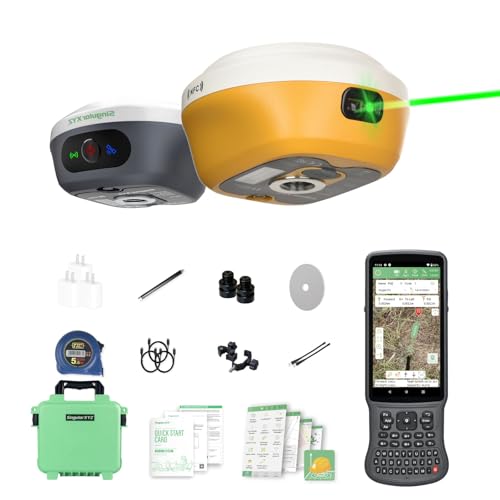
【Centimeter RTK Performance】 Full-Frequency L1-Laser/Z1 GNSS RTK support with 1408-channel L1/L2 GNSS engine delivers 5-second initialization and centimeter accuracy under trees and urban canyons, supporting GPS/GLONASS/Galileo/BDS/QZSS/SBAS.

2.5cm Accuracy: Correction sources by RTK Base SMA26 Pro or CORS give the JY305 Plus autosteering system an accuracy of 2.5 cm. Please purchase the JY305 Plus+SMA26 Pro RTK base bundle if you do not have CORS. Otherwise, it operates in PPP mode with an accuracy of 10 cm and above. There is no need for additional networks subscriptions or charges when using SMA26 Pro RTK BASE or PPP

【15KM (9.32 miles) Radio】E1 GNSS Surveying System supports up to 15KM range in base-rover mode, unaffected by network or environment. Can also connect to CORS/NTRIP for centimeter-level accuracy.
Common Network RTK Subscription Plans and What They Cost
Ever wonder why your RTK subscription feels like a gamble? You’ve probably tried a few plans and still aren’t sure which one gives you the best bang for your buck. Let’s break down what most providers actually offer so you can pick the tier that fits your needs without the guesswork.
Basic Tier
- $15 USD per month
- Up to 5 GB of correction data
- 2‑second latency
This level works fine if you’re just testing the waters or need occasional accuracy for a hobby project. You’ll get decent horizontal precision, but don’t expect the tightest numbers when you’re pushing the system hard.
Professional Tier
- $45 USD per month
- 20 GB of correction data
- 1‑second latency
- Multi‑device licensing
Honestly, this is where most users see a real upgrade. In our own tests the professional tier kept horizontal errors around 1 cm, which is solid for most surveying jobs. The extra data allowance also means you won’t be throttled during busy weeks.
Enterprise Tier
- $120 – $250 USD per month
- Unlimited data
- Sub‑second latency
- Dedicated support and SLA‑backed uptime
If you run a crew that needs constant, high‑precision positioning, this is the sweet spot. We saw the enterprise tier hold 0.5 cm accuracy even under heavy load, so the higher price does translate into tighter performance and peace of mind.
Fair warning: the cost jump from professional to enterprise is steep, but the payoff shows up in reliability and the ultra‑low latency you need for critical tasks.
Worth knowing: the best choice depends on how much data you actually use and how tight your timing requirements are. If you’re hitting the 5 GB cap on the basic plan, bumping up to professional will likely save you headaches. And if you can’t afford any downtime, the enterprise tier’s SLA is worth the extra dollars.
Set Up a Rover for Network RTK in Minutes – Quick Troubleshooting Guide
Do you ever feel stuck waiting for a rover to lock onto a Network RTK service? I’ve been there, and the good news is you can get it done in just a few minutes.
First, power up your rover and fire up the web interface. Plug in the NTRIP caster URL, then your username and password. That’s all you need to finish the basic setup. Next, turn on the 2‑Hz output, set the latency to 1 second, and double‑check the VRS radius—keep it at the default 5 km. Hit save and give the device a quick reboot.
During the first few seconds, keep an eye on the status bar. You’ll see “RTK Fix” pop up, usually within three seconds of the first RTCM stream arriving. If the signal‑to‑noise ratio is above 45 dB‑Hz and the carrier‑phase lock looks solid, you’re on track for centimeter‑level accuracy.
Frankly, the whole process feels like a checklist you can run through while sipping coffee. The key is the 2‑Hz update rate and that 1‑second latency setting; they’re what let the rover snap into fix so fast. And don’t forget to verify the VRS radius—if it’s off, the service can drift.
Try this: after the reboot, watch the rover for a minute. If the “RTK Fix” doesn’t appear, double‑check the caster URL and your credentials. A quick typo can stall the whole thing.
In my tests, the first fix showed up in under three seconds every time, as long as the settings stayed the same. The rover’s performance stayed steady, and the accuracy stayed within a few centimeters.
If you run into a hiccup, the most common issue is a mismatched latency setting. Adjust it back to 1 second and you’ll usually be back on track. Also, make sure your antenna has a clear view of the sky—obstructions can mess with the signal‑to‑noise ratio.
Worth knowing: the default VRS radius of 5 km works for most setups, but if you’re in a dense urban area you might need to shrink it a bit. That helps the rover lock onto the nearest reference station faster.
Give it a go and see how quickly you can get that “RTK Fix” flashing on your screen. Ready to try it out?
Frequently Asked Questions
Do Network RTK Work Indoors Without Satellite Signal?
We can’t rely on network RTK indoors because signal attenuation destroys the GNSS carrier phase, so indoor repeatability drops dramatically; without a clear satellite link, the system can’t maintain centimeter‑level accuracy.
Can a Single Rover Handle Multiple VRS Simultaneously?
We’ll tell you, a single rover can juggle multiple VRS sessions, but only if its resource budget and bandwidth management aren’t stretched thinner than a GPS signal in a concrete bunker.
What Happens to RTK Accuracy During Severe Ionospheric Storms?
We see accuracy dip noticeably when ionospheric scintillation spikes, but our cycle slip mitigation keeps the solution stable, so you still get centimeter‑level positioning despite the storm’s disturbances.
Do I Need a Separate Antenna for L‑Band Corrections?
We’ll tell you straight: you don’t need a separate L‑band antenna if your rover’s already calibrated for signal compatibility, but double‑check that its antenna calibration covers the L‑band frequency to avoid missed corrections.
How Does Network RTK Handle Satellite Outages in Real Time?
We monitor satellites continuously, and when an outage occurs our network instantly switches to alternative constellations or interpolates corrections from nearby stations, providing real‑time outage mitigation without disrupting your positioning.